Admin overview
Home of the operator shell. Sample KPIs teach the layout; they are not live CRM numbers yet.
After admin sign-in you land here. The page is a map of the shell: sidebar, command palette, help, language and your account — plus placeholder operational cards.
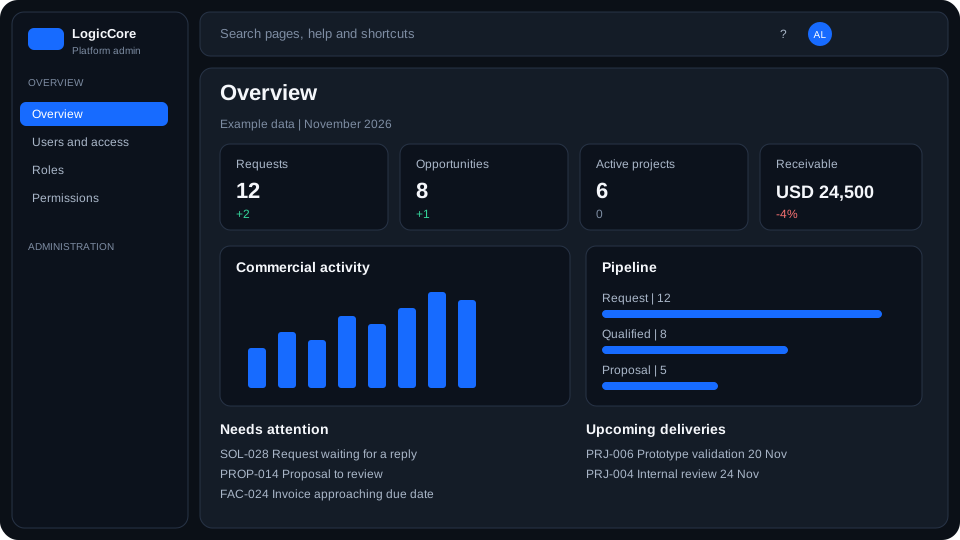
What you are looking at
- KPI cards and queues are scaffold samples. They do not read CRM, finance or delivery data.
- Sidebar groups work you can open today (Users and access, Roles, Permissions) and later ERP modules.
- Header search (⌘K) jumps to pages, help articles and actions such as Add role.
- The ? icon opens the Help article for this screen.
How to move around
- Use the sidebar on desktop. On a phone, open the header menu (☰).
- Collapse the sidebar to icon rail; hover peeks labels without changing the page width.
- Open Users and access, Roles or Permissions to work with IAM.
- Account menu → My profile for name, photo and password.